Translating my Godot game with Weblate
20. May 2026
18. August 2026 last update
My Godot game 99Managers, a sport management game, has a lot of UI and text. All buttons, labels and emails can be translated to reach more players. Godot supports simple csv or the more feature rich gettext for translations.
Translation platforms like Weblate instead, allow to translate a game without ever opening Godot. No developer skills needed and everything can be done on a nice and user-friendly website.
Weblate
Weblate is a FOSS translation platform, that generously gives free hosting for open source projects. I've been using it now for about a year and I have to say: Thank you Weblate! In that time my game has been translated to over 12 languages by 45 contributors. Therefore also a big Thank you to all contributors! You can see the current translation status on my projects Weblate page.
Weblate has a big community of translators. Therefore you might get translations from people that simply like translating FOSS projects. This way also non-developers can contribute and help the FOSS ecosystem.
Connecting a game to Weblate takes time, but normally once setup, no further intervention is needed. I won't go into detail on this, since the setup might differ from project to project. The best place to get started is the official Weblate docs.
Note: Weblate can also be used for closed source projects by paying or trough self-hosting. Codeberg also hosts a Weblate server for the projects hosted there.
csv vs gettext
As in all my previous games, I used the simple key/value csv file for translations. Weblate accepts a lot of file formats for translations and supports also those csv files. But things got ugly very fast. I can't remember what problems I faced, but I quickly migrated to gettext. Gettext is afaik the best supported format on Weblate and other translation platforms.
The first big difference between csv and gettext, is that gettext uses the original string as id. So for example the csv key "ABOUT_TEXT" simply becomes "This game is a FOSS Futal management game". This has the big advantage that you already can see the real text in the Godot editor. This also means that the if the base string changes, all translations need to be updated. But gettext is quite smart and keeps the old outdated translation, so nothing is lost.
Another big advantage of using gettext is translation context. For example some words might mean different things depending on the context. The word "Menu" can have different meanings if used on a button or as label on in a Restaurant. By providing the context gettext, adds the context information to the template file.
button.text = tr("Menu", "Button")
restaurant_menu_label.text = tr("Menu", "Restaurant")
This make is possible to have two different translations for the same word. It also helps the translator to understand in which context the word is used.
You can even add more information with the "# TRANSLATORS:" comment. I mostly use it to show an example for strings with placeholders.
# TRANSLATORS: Example: The Italian Cup has been won by Bolzano.
cup_info.text = "The {competition_name} has been won by {team_name}."
pot/po files
Gettext uses pot/po files, that get generated automatically from the source code. The base language is located in the pot file, also called template. All translations instead are done in po files.
Technically a this files can also be crafted by hand, because they are pure text and very simple. The keyword msgid points to the original string and msgtstr the translation. In the template, msgtstr stays empty.
# template.pot

msgid "Hello World!"
msgstr ""

msgid "This is a pot file."
msgstr ""
And here the Italian translation po file.
# it_IT.po

msgid "Hello World!"
msgstr "Ciao Mondo!"

msgid "This is a pot file."
msgstr "Questo è un file pot."
Generation pot files with the Godot Editor
Godot assumes that every Node that has text should be translated. To prevent that a Node gets translated, you can set Auto Translate to Disabled in the inspector. For GDScript instead, it follows some simple rules.
Godot then generates the .pot file automatically for you. But it needs to know which scenes or scripts contain translations. This can be set in Project > Project Settings > Localization > Template Generation. There is no "translate everything" checkbox yet.
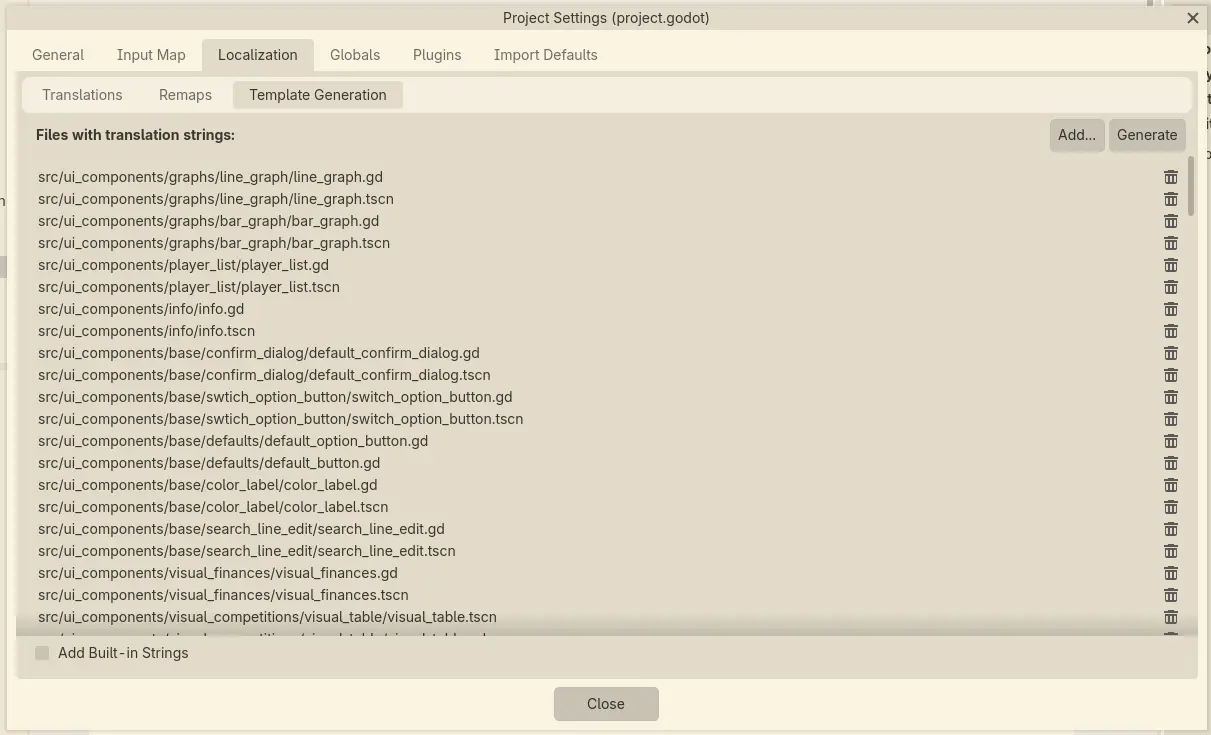
After clicking the Generate button, the pot template file is generated. The pot template can be used to create po translation files. Weblate for example just needs the pot file and creates the po files automatically.
Once you have a po file, it can be added in Project > Project Settings > Localization > Translations. This makes the language available to the TranslationServer.
print(tr("Hello World!")) # Hello World!

var locale: String = "it_IT"
TranslationServer.set_locale(locale)

print(tr("Hello World!")) # Ciao Mondo!
The "Files with translations strings" list from the last image can become a nightmare to maintain. New or renamed files need to be added manually every time. I often forgot this, leading to missing translations.
There are some interesting addons I saw that would make this much easier. For example Godot-POT-Plugin shows a tree of all files instead of a list. This makes selecting multiple files at once much easier. But I follow my no-addons policy very strictly and therefore I need to pass here.
Now I use a script to get all .tscn and .gd files and put them into the project.godot file. It runs every time I run my test suite. This way, I always have all files covered and I no longer need manual adaptions of the list.
Let players know they can help
The translations will hardly be always complete or correct, especially in early development. The more it is important to let players know that translation might not be yet 100%. I show the current translation state of every language in the settings.
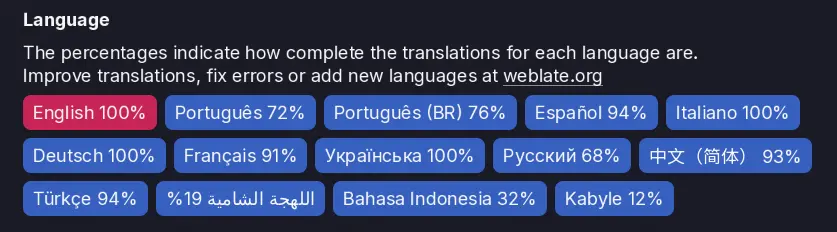
This way players also get informed about Weblate and that they can help with translations.
Choose your font wisely
I never expected that one day someone will translate the whole game into Simplified Chinese. To my surprise, it did not work instantly after activating the language. It did work for other languages like Arabic or Ukrainian, that do not have the Latin alphabet. Then I added Noto Sans Simplified Chinese as fallback font and it worked. This totally makes sense, because the Chinese language has a lot of special characters. The Chinese one is 17MB big, but my other font is less than 1MB.
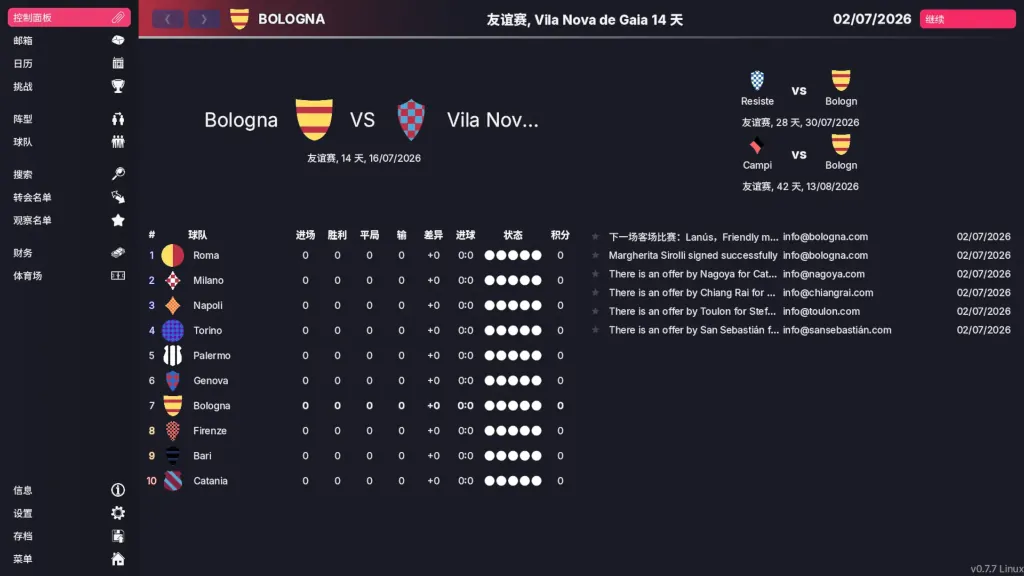
Just keep this in mind when choosing a font, that might only support Latin alphabet. But of course this are those things nobody plans for, until it happens.
More tips and tricks
If you save textual content directly in save games, I recommend to use the base language. This way it can still be translated to other languages. I had this issue when I saved all email's text in the user defined language. That way the text could no longer be translated to other languages. The text would also always stay the same and cannot be changed/fixed by an update. Now I only save a reference id, that safes disk space and allows translations and fixes.
If you want to create .po translation files locally, I recommend the tool Poedit. To prevent conflicts I normally do local translations before pushing the .pot template to Weblate.
Keep the base strings simple, verbose and dumb. Use placeholders only for proper nouns like names if possible. I tried to reduce needed translations by using a placeholder for the next match location. The string was "Next {location} match is against {team_name}." But apparently in Portuguese {location} cannot simply be replaced by home/away. Home translates to "em casa" but away to "fora", for reasons (I don't speak Portuguese). Now I use "Next home match is against {team_name}." and "Next away match is against {team_name}." This way it is more work, but allows to translate it correctly.
On Weblate every string can have a screenshot attached, that shows the string in action. This can help a lot to improve the quality and to provide more context. I don't use them yet, because while developing, screenshots get obsolete very fast.
Once in a while, take some times to check the generated pot file manually. Sometimes strings get added, that should not. I had this mysterious bug that all 0 numbers in labels suddenly showed the number 20. Luckily I discovered that the number 0 got added and somehow translated to 20 in Italian.
Quality checks with Weblate
Weblate checks automatically for many basic translation mistakes. For example it makes sure that the punctuation and new lines match. But afaik it can't detect if a translation is correct. This still needs to be done by the players of the game.
Weblate allows to have maintainers/moderators that need to approve translations. My game still has to few contributors that this makes sense. If the game one day financially succeeds, I will hire professional translators as maintainers.
Security
Technically translations can be seen as user generated input. For this reason I highly recommend reading the handling user input safely section in the docs. Someone could misuse bbcode features, like nested loops and can crash the game. Even injecting/replacing urls is possible. To mitigate this risks, I have some tests that check all urls in the translations. I still have to extend this tests to make all bbcode safe.
Every feedback is welcome
Feel free to write me an email at info@simondalvai.org and comment on Mastodon.
Exit through the gift shop
Buy my latest game on Steam to support my work.